It’s important that as a pet care services professional, you have a short YouTube video introduction on your Petworks listing page. Video helps personalize you to pet parents. And our data shows that videos greatly increase bookings. An ideal video introduction should be just a minute or two long, although there is no length restriction. Here is how you can embed a YouTube video into your Petworks listing page:
 Step 1: Go to your Edit Listing page
Step 2: On your edit listing page, about 1/5th of the way down the page, you will see a field where you can add a URL of a YouTube video. The URL should not be your YouTube Channel URL. The URL needs to be the URL of the YouTube video itself:
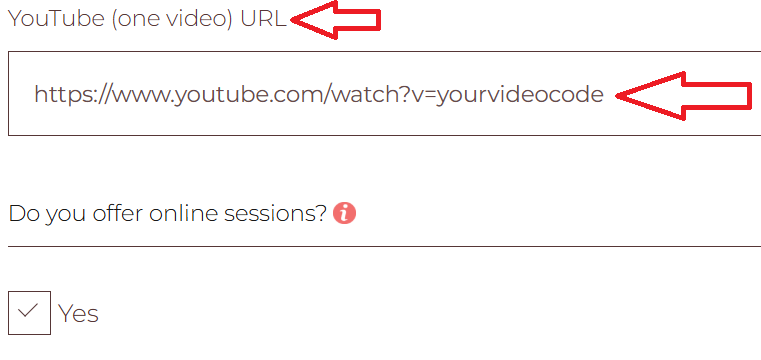
Step 3: Once you have added the URL of your YouTube video, be sure to scroll down to the bottom of the page and click on the brown colored “Save” bar.
Your Petworks listing page will now have a nice looking video introduction which pet parents can view, while they remain on your Petworks listing page: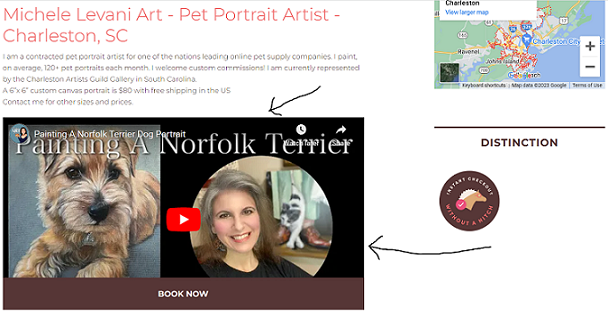
More About Petworks

Petworks Co-Founder Kevin Kinyon is a life-long animal lover who works tirelessly to improve the lives of pets and their parents. Human and animal qualities he values most are integrity, humor, and empathy.

 petworks tm