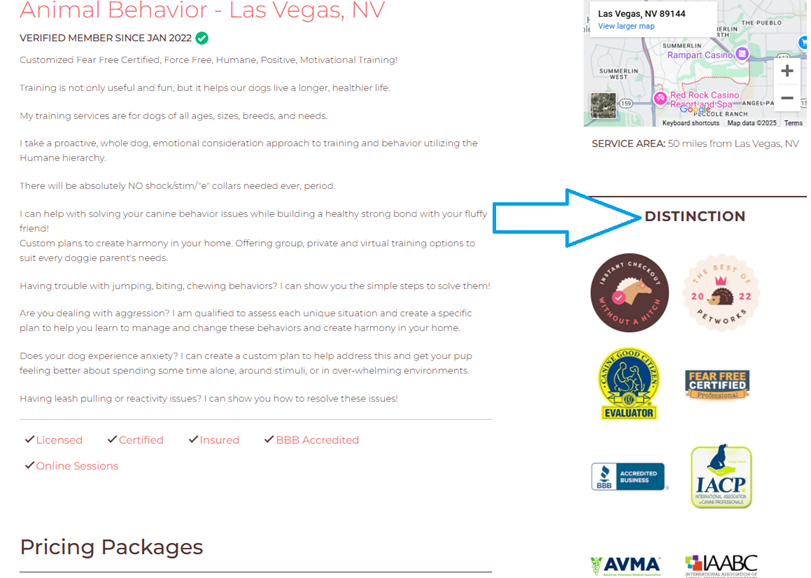
As a pet care service professional, you can make your Petworks listing page stand out from the crowd by adding distinction icons to your page. Distinction icons are certifications, associations, and Petworks Awards which function as badges on your listing page. They help pet parents know how experienced and accomplished you are at your craft. And they stand out and make a great first impression! Here is how you can add them:
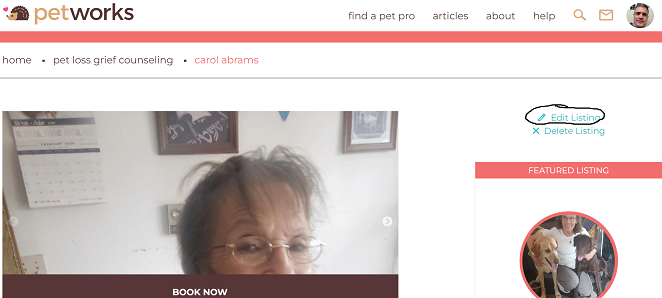
 Step 1: Go to your listing page URL, and click on the blue ‘Edit Listing’ link, which is located near the upper right hand corner of your listing page:
Step 2: Now that you are on your ‘Edit Listing’ page, scroll about halfway down the page, and look for the sections of Certifications (“Pet Certifications”) and Associations (“Proud member of…”). Check off all the certifications you have and all the associations you belong to. Then scroll to the bottom of the page and click on the brown-colored “Save” button.
Step 3: Petworks will add your distinction icons for you, based on what you checked off in the Certifications and Associations sections.
You’ll now have great looking distinction icons displayed on your Petworks listing page! This will be sure to help pet parents decide to contact and book you for the pet care services you provide:
More About Petworks

Petworks Co-Founder Kevin Kinyon is a life-long animal lover who works tirelessly to improve the lives of pets and their parents. Human and animal qualities he values most are integrity, humor, and empathy.

 petworks tm