As a pet care services professional, you’ll want to be able to access your booking records on Petworks. This will help you keep track of past and present bookings, organize your pet parent clients, see how much you’ve been earning, and help you when it comes time to file your annual tax returns. Here’s how you can access your historical bookings on Petworks:
 Step 1: Go to your Petworks Account Page .
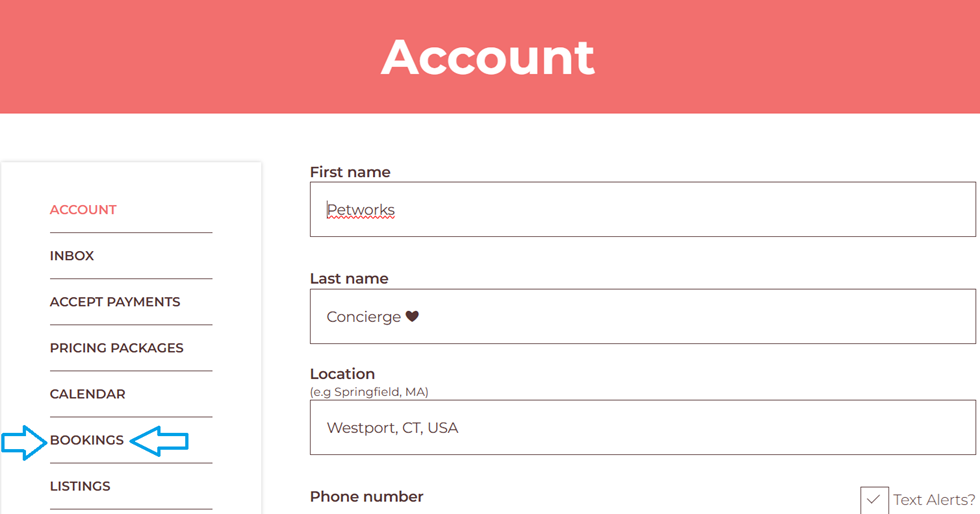
Step 2: Click on the ‘Bookings’ link:
Step 3: On the next page, you’ll see all of your bookings history, sorted by month and year. To view more detailed information about each booking, click on the brown-colored ‘View’ button which corresponds to a particular booking.
Step 4: Then on the next page, you will be able to download the booking information by clicking on the brown-colored ‘Download’ bar which is located at the bottom of the page.
More About Petworks

Petworks Co-Founder Kevin Kinyon is a life-long animal lover who works tirelessly to improve the lives of pets and their parents. Human and animal qualities he values most are integrity, humor, and empathy.

 petworks tm