Petworks File Exchange® empowers pet care service professionals and pet parents, by facilitating seamless file sharing directly within the Petworks platform…
 Sharing important information such as images, PDFs, intake forms, and Word Documents, is effortless, thus enhancing seamless communication and collaboration. For example, you can contracts and invoices to your pet parents. And you can receive pet photos from pet parents for lost pet recovery efforts, communication, and custom pet portrait paintings.
Supported file types include .JPEG, .PNG, .PDF, and .DOC (Microsoft Word). Here’s how you and a pet parent can exchange files with each other:
Step 1: Go to your Petworks Inbox
Step 2: Go to the conversation thread you’re having with a pet parent. Then click on the small tan colored upload icon which is located just above the message text field: 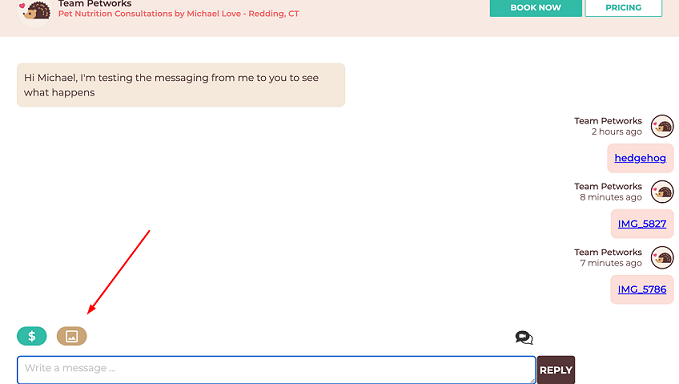
This makes file sharing easy. And you never need to leave the Petworks platform in order to exchange documents, images, and files.


 petworks tm