As a Petworks pet care service professional, it’s important that you know how you can find your listing page. This will allow you to share your listing page with prospective pet parents, make edits to it, and have a look at it from time to time, to make sure it looks and reads exactly the way you want it to. Here’s how you can go to your Petworks listing page:
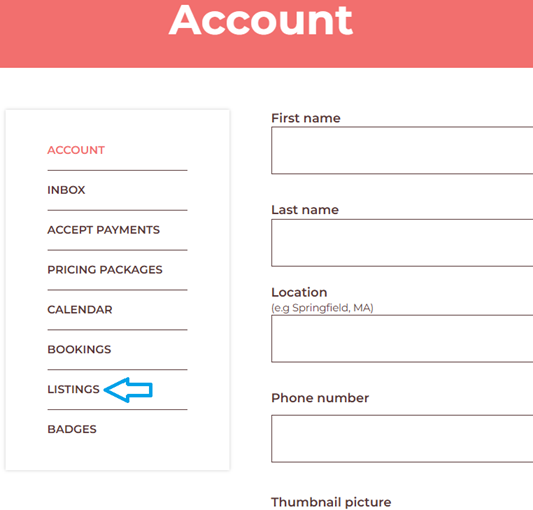
 Step 1: Go to your Petworks Account page.
Step 2: Along the left hand side, click on the ‘Listings’ link:
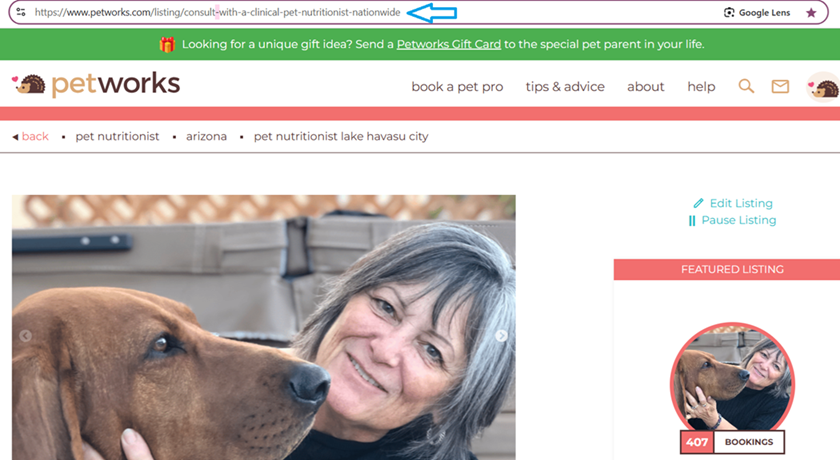
Step 3: You will now be on your Petworks Listing page. Notice the URL address along the top. That is the web address you can give to people who want to know where they can find you on Petworks.
More About Petworks

Petworks Co-Founder Kevin Kinyon is a life-long animal lover who works tirelessly to improve the lives of pets and their parents. Human and animal qualities he values most are integrity, humor, and empathy.

 petworks tm