‘Auto Responder’ is easy to set-up. It saves you time. And it helps increase your bookings. Pet Parents contacting you for the first time will instantly get a reply from you regarding their request for pet care service needs. This greatly improves your chances of getting pet parents to respond and book you. In your auto-response message, you can ask pet parents important questions and seek pertinent information about their specific pet care needs, dates, location, etc. You can also let them know important things about your services and your availability. Here are the steps for setting it up:
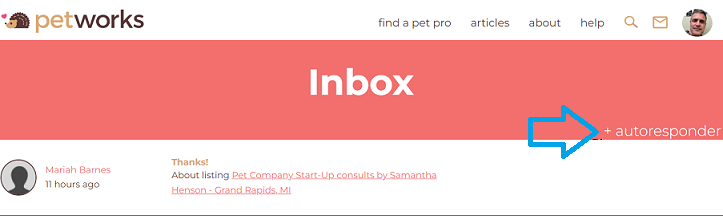
Step #1: To create an ‘Auto Response’, go to your Petworks Account, then go to your Petworks ‘Inbox’, then click the “+” sign next to the word ‘autoresponder’:
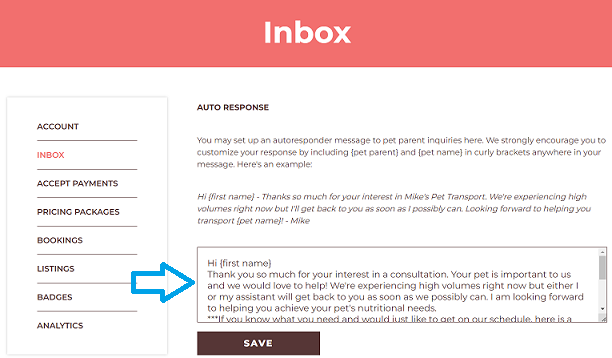
Step #2: Then, on the next page, you can type in your automatic response. Once you’ve finished writing and have saved it, new pet parents will automatically receive a message from you just seconds after they’ve reached out to you for the first time on Petworks:
More About Petworks

Petworks Co-Founder Kevin Kinyon is a life-long animal lover who works tirelessly to improve the lives of pets and their parents. Human and animal qualities he values most are integrity, humor, and empathy.

 petworks tm